PORTfOLIO
Project: A 1-Hour E-Learning Solution to an Instructional Problem
.jpg)

The Challenge
Sixth-grade students at Golden Maple Middle School were struggling with foundational literacy skills-specifically summarizing and identifying main ideas. Working within my M.Ed. program, I collaborated with school administration to design a one-hour e-learning solution to bridge this comprehension gap across subjects.
The Strategy
Using a Human-Centered Design approach, I developed empathy maps and personas to ensure the solution resonated with 11-year-old learners. The curriculum was scaffolded using Bloom’s Taxonomy and UDL principles, moving students from simple recall to active application.
The Solution
I designed an interactive e-learning experience grounded in Gagné’s Nine Events of Instruction. To increase engagement, I replaced standard multiple-choice questions with a creative "Illustration Hook," where students visually map out supporting details. This turned an abstract literacy skill into a concrete, hands-on creative exercise.
View Live Sample


Project: An Educational AI Agent for Special Education Teachers

.jpg)
.jpg)
.jpg)
The Problem
Special Education teachers spend an average of 5–10 hours a week manually creating differentiated materials. Existing "one-size-fits-all" worksheets often fail to meet specific IEP (Individualized Education Program) goals or lack the precise data-tracking tables required for legal compliance.
The Solution
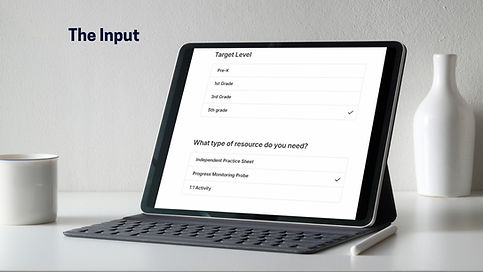
I built ScaffoldSync, an AI-driven agent that transforms raw IEP goals and student baseline data into three distinct, ready-to-print instructional assets.
Key Engineering Features
-
Context Engineering: Utilized XML-tagged system prompts to ensure the LLM (Claude 4.5 Sonnet) strictly adheres to student complexity levels without "hallucinating" inappropriate content.
-
Conditional Logic: Implemented a multi-modal "Resource Type" selector that reconfigures the AI’s output-switching from repetitive independent practice to interactive small-group activities based on user needs.
-
Adaptive Data Architecture: Created a custom "Data Tracking Logic" layer that analyzes the IEP goal type (Accuracy, Frequency, or Duration) to automatically generate the correct legal tracking table on the final document.
-
Automated Asset Pipeline: Engineered a workflow that bypasses manual formatting by passing raw AI Markdown into a Generate Asset block, producing pixel-perfect, branded PDFs.
The Impact
ScaffoldSync transforms a 45-minute manual design process into a 30-second automated workflow. By solving the "administrative tax" of special education, it ensures every student receives legally compliant, highly scaffolded materials while returning hours of instructional time back to the teacher.
Demo
Project: Educational Explainer Video for Mixed-Level Special Education Class
The Challenge
In a mixed-level special education setting, students required a consistent, repeatable method for solving addition problems. The goal was to bridge the gap between abstract numbers and concrete procedures while meeting specific Individualized Education Program (IEP) objectives and state math standards.
The Solution I designed and produced a targeted instructional video using Canva, focusing on a step-by-step visual breakdown of the addition process. By removing the complexity of regrouping, I created a "success-first" learning tool that built student confidence and procedural fluency.
The Strategy
-
Standards-Aligned: Mapping content directly to state standards and individual student IEP goals.
-
Cognitive Load Management: Using clear, high-contrast visuals and simplified audio cues to support diverse neurodivergent learners.
-
Multi-Modal Learning: Combining text, voiceover, and visual movement to reinforce the mathematical process.
Project: K-12 E-Learning Professional Development — Challenges & Evidence-Based Solutions

.png)
.png)